5.1.  Follow Along: Creating a script for the mask file
Now, to get the  r.neighbors algorithm to work correctly, we
need to create a mask file script.
r.neighbors algorithm to work correctly, we
need to create a mask file script.
Warning
This is a exercise. Only do this if you have extra time left.
Otherwise, go directly to the solution. Doing
this exercise will also help you with Follow Along: Making a script for batch rasterizing.
5.1.1. Creating a model
We will create a model that we will convert to a script. Click

Drag in the following inputs:
 Number:
Description:
Inner radiusNumber type:

IntegerMinimum value:
0Default value:
1
- Number:
Outer radius, similar to Inner radius
Name the model
Annulus mask for r.neighbors. Optionally, also give it a group name.Click the
 Export as Script Algorithm icon.
The following script will appear. Places where we will insert some of our own code are highlighted.
5.1.2. Add additional parameters
In the model, we have only added two inputs. However, our algorithm should also have an output. At line 11, insert the following:
from qgis.core import QgsProcessingParameterFileDestination
and within the initAlgorithm function (line 18) insert:
"innerradius",
5.1.3. Convert parameters to workable format
There is one problem with these processing parameters, however: they are not actually
values that we can work with. However, we want to be able to use them as numbers or strings (in
the case of file names). For this we will use the parameterAsInt() and
parameterAsFileDestination() At line 23, insert the following.:
        self.addParameter(
            QgsProcessingParameterNumber(
                "outerradius",
                "outer radius",
5.1.4. Perform calculations
What we want is a function that creates a file like below for an inner, resp. outer radius of: \(r_i=1,r_o=3\)
0 0 1 0 0
0 1 1 1 0
1 1 0 1 1
0 1 1 1 0
0 0 1 0 0
This file is a mask file with weights e.g. numbers between 0 and 1, that tell GRASS how much this cell matters for the calculation of the tpi.
Note
I did not come up with these calculations myself, but found them on stackexchange. Sadly, I forgot where.
Note that the 0 in between
all the 1s is the center is the point that corresponds to the center. It is actually at coordinates
\((x_0,y_0)=(3,3)\) (start counting at 0). This is what r.neighbors expects. It follows that
\(x_0=y_0=r_o\). Let \(d\) be the distance to this point. Then, we want all
points to be 1 for which:
holds and 0 otherwise. The (eucludian) distance can be calculated by:
where \(x,y\) are the coordinates of the Currently processed point. To put this in code, we first need to import the corresponding functions:
from numpy import sqrt, fromfunction, logical_and, savetxt
and then make the calculations. Here a ** b means \(a^b\). Also note
that the size of our array is \(2r_o+1\)
                minValue=2,
                defaultValue=3,
Then, we save our file to outloc in decimal ("%d") format:
)
Your final script should look like this:
 Solution
If you didn’t follow the above Follow Along:, you can use the below script.
In the Processig Toolkbox, click the

copy-paste the following code into the text editor that popped up:
 1"""
 2Model exported as python.
 3Name : annulus mask for r.neighbours
 4Group :
 5With QGIS : 32200
 6"""
 7
 8from qgis.core import QgsProcessing
 9from qgis.core import QgsProcessingAlgorithm
10from qgis.core import QgsProcessingMultiStepFeedback
11from qgis.core import QgsProcessingParameterNumber
12from qgis.core import QgsProcessingParameterFileDestination
13import processing
14
15from numpy import sqrt, fromfunction, logical_and, savetxt
16
17
18class AnnulusMaskForRneighbours(QgsProcessingAlgorithm):
19    def initAlgorithm(self, config=None):
20        self.addParameter(
21            QgsProcessingParameterNumber(
22                "innerradius",
23                "inner radius",
24                type=QgsProcessingParameterNumber.Integer,
25                minValue=1,
26                defaultValue=1,
27            )
28        )
29        self.addParameter(
30            QgsProcessingParameterNumber(
31                "outerradius",
32                "outer radius",
33                type=QgsProcessingParameterNumber.Integer,
34                minValue=2,
35                defaultValue=3,
36            )
37        )
38        self.addParameter(
39            QgsProcessingParameterFileDestination("outfile", "annular mask")
40        )
41
42    def processAlgorithm(self, parameters, context, model_feedback):
43        # Use a multi-step feedback, so that individual child algorithm progress reports are adjusted for the
44        # overall progress through the model
45        feedback = QgsProcessingMultiStepFeedback(0, model_feedback)
46
47        r_in = self.parameterAsInt(parameters, "innerradius", context)
48        r_out = self.parameterAsInt(parameters, "outerradius", context)
49
50        outloc = self.parameterAsString(parameters, "outfile", context)  # + ".txt"
51
52        d = sqrt(
53            fromfunction(
54                lambda x, y: (x - r_out) ** 2 + (y - r_out) ** 2,
55                (2 * r_out + 1, 2 * r_out + 1),
56            )
57        )
58        m = logical_and(d >= r_in, d < r_out)
59        feedback.pushInfo(str(m))
60        savetxt(outloc, m, fmt="%d")
61
62        results = {}
63        outputs = {}
64
65        return results
66
67    def name(self):
68        return "annulus mask for r.neighbours"
69
70    def displayName(self):
71        return "annulus mask for r.neighbours"
72
73    def group(self):
74        return ""
75
76    def groupId(self):
77        return ""
78
79    def createInstance(self):
80        return AnnulusMaskForRneighbours()
 Save the script. It should now show up in the toolbox:
5.1.5. Testing the annulus mask
Now you have made the annulus mask file, either by following the instructions or skipping to the solution, now it is time to test whether the annulus mask we just made actually works.
Search for
annulus mask for r.neighborsin the processing pane and run it.Use default settings, but set annular mask to a file name with a
.txtextension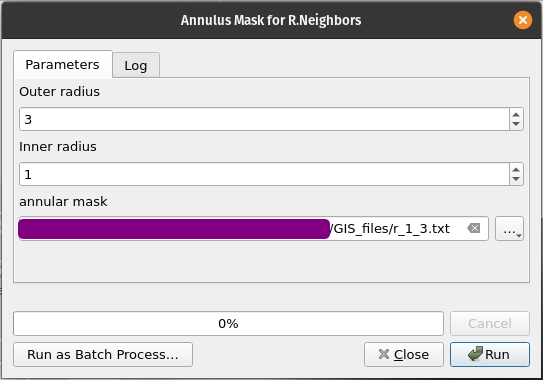
If you have any errors, read the error, see where it comes from and resolve them.
open the file and verify if it is made correctly.