5.2.  Follow Along: Making a script for rasterizing like
The easiest - and first - change we will make is to make a rasterization tool that automatically aligns the output raster to a reference raster.
5.2.1. Creating a model and save as Python
Create a new model, name it Rasterize like and add the following:
 Raster layer named
 reference- Vector layer named
vector - Vector field named
rasterize field - Number named
nodata valuewith:Default value: \(-999\)
Number type:
Float
 gdalrasterize with:
Input layer:

vectorField to use for a burn-in value:
Rasterize fieldOutput raster size units:

Georeferenced unitsOutput extent:
reference Rasterized:
 Rasterized
Convert the model to Python by clicking the
 icon.
icon.
  1"""
  2Model exported as python.
  3Name : Rasterize like
  4Group :
  5With QGIS : 32212
  6"""
  7
  8from qgis.core import QgsProcessing
  9from qgis.core import QgsProcessingAlgorithm
 10from qgis.core import QgsProcessingMultiStepFeedback
 11from qgis.core import QgsProcessingParameterVectorLayer
 12from qgis.core import QgsProcessingParameterField
 13from qgis.core import QgsProcessingParameterRasterLayer
 14from qgis.core import QgsProcessingParameterNumber
 15from qgis.core import QgsProcessingParameterRasterDestination
 16from qgis.core import QgsProcessingParameterDefinition
 17import processing
 18
 19
 20class RasterizeLike(QgsProcessingAlgorithm):
 21    def initAlgorithm(self, config=None):
 22        self.addParameter(
 23            QgsProcessingParameterVectorLayer("vector", "vector", defaultValue=None)
 24        )
 25        self.addParameter(
 26            QgsProcessingParameterField(
 27                "rasterizefield",
 28                "rasterize field",
 29                type=QgsProcessingParameterField.Any,
 30                parentLayerParameterName="vector",
 31                allowMultiple=False,
 32                defaultValue=None,
 33            )
 34        )
 35        self.addParameter(
 36            QgsProcessingParameterRasterLayer("raster", "reference", defaultValue=None)
 37        )
 38        param = QgsProcessingParameterNumber(
 39            "nodatavalue",
 40            "nodata value",
 41            type=QgsProcessingParameterNumber.Double,
 42            defaultValue=-999,
 43        )
 44        param.setFlags(param.flags() | QgsProcessingParameterDefinition.FlagAdvanced)
 45        self.addParameter(param)
 46        self.addParameter(
 47            QgsProcessingParameterRasterDestination(
 48                "Output", "output", createByDefault=True, defaultValue=None
 49            )
 50        )
 51
 52    def processAlgorithm(self, parameters, context, model_feedback):
 53        # Use a multi-step feedback, so that individual child algorithm progress reports are adjusted for the
 54        # overall progress through the model
 55        feedback = QgsProcessingMultiStepFeedback(1, model_feedback)
 56        results = {}
 57        outputs = {}
 58
 59        # Rasterize (vector to raster)
 60        alg_params = {
 61            "BURN": 0,
 62            "DATA_TYPE": 5,  # Float32
 63            "EXTENT": parameters["raster"],
 64            "EXTRA": "",
 65            "FIELD": parameters["rasterizefield"],
 66            "HEIGHT": 0,
 67            "INIT": None,
 68            "INPUT": parameters["vector"],
 69            "INVERT": False,
 70            "NODATA": parameters["nodatavalue"],
 71            "OPTIONS": "",
 72            "UNITS": 1,  # Georeferenced units
 73            "USE_Z": False,
 74            "WIDTH": 0,
 75            "OUTPUT": parameters["Output"],
 76        }
 77        outputs["RasterizeVectorToRaster"] = processing.run(
 78            "gdal:rasterize",
 79            alg_params,
 80            context=context,
 81            feedback=feedback,
 82            is_child_algorithm=True,
 83        )
 84        results["Output"] = outputs["RasterizeVectorToRaster"]["OUTPUT"]
 85        return results
 86
 87    def name(self):
 88        return "Rasterize like"
 89
 90    def displayName(self):
 91        return "Rasterize like"
 92
 93    def group(self):
 94        return ""
 95
 96    def groupId(self):
 97        return ""
 98
 99    def createInstance(self):
100        return RasterizeLike()
5.2.2. Inspecting the resulting Python script
A new screen will appear with quite a long script. Let’s break it down! It
starts by a docstring (indicated by """):
1"""
2Model exported as python.
3Name : Rasterize like
4Group :
5With QGIS : 32212
6"""
Next, we import all necessary classes and modules:
 8from qgis.core import QgsProcessing
 9from qgis.core import QgsProcessingAlgorithm
10from qgis.core import QgsProcessingMultiStepFeedback
11from qgis.core import QgsProcessingParameterVectorLayer
12from qgis.core import QgsProcessingParameterField
13from qgis.core import QgsProcessingParameterRasterLayer
14from qgis.core import QgsProcessingParameterNumber
15from qgis.core import QgsProcessingParameterRasterDestination
16from qgis.core import QgsProcessingParameterDefinition
17import processing
Next, the start of our class starts. This is indicated by:
20class RasterizeLike(QgsProcessingAlgorithm):
Note
Inheritance
Our BatchRasterize class inherits from
QgsProcessingAlgorithm (indicated by the brackets).
This means that all methods and attributes of
QgsProcessingAlgorithm are also available for
BatchRasterize.
All later lines are indented. This means that everything defines aspects of that class. There are two important methods:
22        self.addParameter(
23            QgsProcessingParameterVectorLayer("vector", "vector", defaultValue=None)
24        )
25        self.addParameter(
26            QgsProcessingParameterField(
27                "rasterizefield",
28                "rasterize field",
29                type=QgsProcessingParameterField.Any,
Is run at the start of the algorithm. Here we define which inputs are available in the prompt. Note that all inputs are filled out. That’s convenient!
Next, the ProcessAlgorithm function executes the actual model:
31                allowMultiple=False,
32                defaultValue=None,
33            )
34        )
35        self.addParameter(
36            QgsProcessingParameterRasterLayer("raster", "reference", defaultValue=None)
37        )
38        param = QgsProcessingParameterNumber(
39            "nodatavalue",
40            "nodata value",
41            type=QgsProcessingParameterNumber.Double,
42            defaultValue=-999,
43        )
44        param.setFlags(param.flags() | QgsProcessingParameterDefinition.FlagAdvanced)
45        self.addParameter(param)
46        self.addParameter(
47            QgsProcessingParameterRasterDestination(
48                "Output", "output", createByDefault=True, defaultValue=None
49            )
50        )
51
52    def processAlgorithm(self, parameters, context, model_feedback):
53        # Use a multi-step feedback, so that individual child algorithm progress reports are adjusted for the
54        # overall progress through the model
55        feedback = QgsProcessingMultiStepFeedback(1, model_feedback)
56        results = {}
57        outputs = {}
58
feedbackis how we can communicate with the user.resultsis a dictionary for resultsoutputsis a dictionary for outputs (results to be loaded into QGIS)alg_paramsis a dictionary with all parameters forgdalrasterize. As you can see, the EXTENT,FIELDandINPUTare already set.processing.run()finally runsgdalrasterize. and stores
it as RasterizeVectorToRasterinsideoutputs.
The final methods define the name and group of the tool and speak for themselves (We also do not need to change these):
60        alg_params = {
61            "BURN": 0,
62            "DATA_TYPE": 5,  # Float32
63            "EXTENT": parameters["raster"],
64            "EXTRA": "",
65            "FIELD": parameters["rasterizefield"],
66            "HEIGHT": 0,
67            "INIT": None,
68            "INPUT": parameters["vector"],
69            "INVERT": False,
70            "NODATA": parameters["nodatavalue"],
71            "OPTIONS": "",
72            "UNITS": 1,  # Georeferenced units
73            "USE_Z": False,
5.2.3. Convert parameters to workable format
We want to extract the pixel size from the raster. For that, we need to have the raster
parameter converted to a raster layer. This is done by the
QgsProcessingAlgorithm.parameterAsRasterLayer() function. Add this at line 38:
38 param = QgsProcessingParameterNumber(
5.2.4. Modifying the algorithm
The only thing we have to change, is that we want the cell width and height to be equal
to the cell width and height of the raster layer. This is done by the raster layer
rasterUnitsPerPixelX() and rasterUnitsPerPixelY() functions. Change the following lines:
41            type=QgsProcessingParameterNumber.Double,
42            defaultValue=-999,
43        )
44        param.setFlags(param.flags() | QgsProcessingParameterDefinition.FlagAdvanced)
45        self.addParameter(param)
46        self.addParameter(
47            QgsProcessingParameterRasterDestination(
48                "Output", "output", createByDefault=True, defaultValue=None
49            )
50        )
51
52    def processAlgorithm(self, parameters, context, model_feedback):
53        # Use a multi-step feedback, so that individual child algorithm progress reports are adjusted for the
54        # overall progress through the model
55        feedback = QgsProcessingMultiStepFeedback(1, model_feedback)
56        results = {}
57        outputs = {}
5.2.5. Testing
Save the script and load it into your toolbox. Now, run it on a vector and raster layer
and see if it worked. Run a raster calculator on both the reference layer and
Rasterized. If it does not error, your rasters are properly aligned!
5.3.  Follow Along: Making a script for batch rasterizing
The previous script was nice, but it is a bit tedious if you want to rasterize a lot of different fields of the same vector dataset. Also, it is error-prone to use in a model, since then field names have to be hard-coded. With the previous script, we are only a few steps away from being able to rasterize a selection of fields with a reference raster!
Note
This solution has been given on stackexchange
Warning
This is a hard exercise. Do not get lost in this, but only follow if
you have extra time.
What we eventually want is a tool like this:
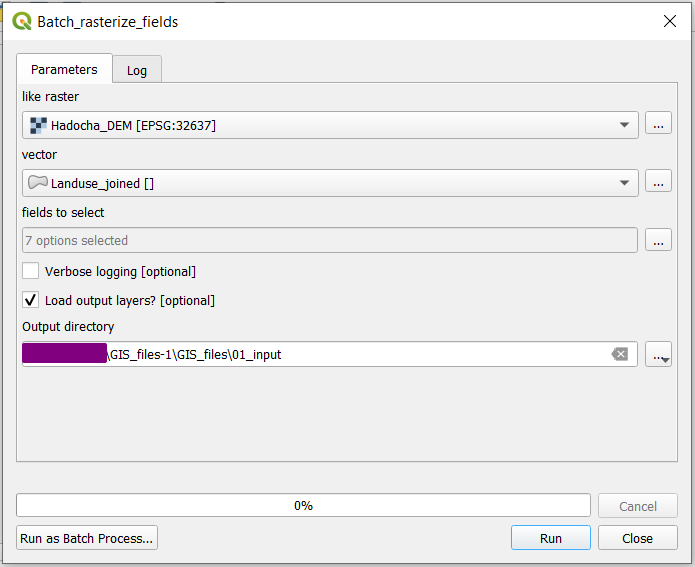
Fig. 5.1 The batch rasterization prompt. All Fields to select will be
turned into rasters, saved as .tiff files inside 01_input
folder.
However, there is a lot that has to be added for this to work exactly as we want, so we will incrementally improve it, according to the following steps:
Make it work as simple as possible
Allow for temporary outputs and give some feedback
Load the layers into QGIS when finished
Add an option to not load outputs into QGIS
5.3.1. Just make it work
In order to just make it work, we want to add a folder input, and dump all the rasters in there.
5.3.1.1. Add additional parameters
In stead of having a raster output, we want a folder destination, so we can put all folders in there.
Add the following to imports:
 8from pathlib import Path
 9
10from qgis.core import QgsProcessing
11from qgis.core import QgsProcessingAlgorithm
12from qgis.core import QgsProcessingMultiStepFeedback
13from qgis.core import QgsProcessingParameterVectorLayer
14from qgis.core import QgsProcessingParameterField
15from qgis.core import QgsProcessingParameterRasterLayer
16from qgis.core import QgsProcessingParameterNumber
17from qgis.core import QgsProcessingParameterFolderDestination
18from qgis.core import QgsProcessingParameterDefinition
19import processing
And change
type=QgsProcessingParameterField.Any,
to
type=QgsProcessingParameterField.Any,
Also, we want to be able to have multiple fields (allowMultiple=True) and select
all by default (defaultToAllFields=True. Change
)
to
)
5.3.1.2. Converting parameters to layers
We need to do two things:
Loop over the selected fields
Save rasters to the output folder with proper names
Thus, we want to be able to work with the fields and output folder. Add the following lines:
40        )
41        param = QgsProcessingParameterNumber(
42            "nodatavalue",
Here, fields is an array of strings, like ["field1", "field2"] and
out_dir is a string like  ,|osx|:code:”/path/to/folder” or
C:pathtofolder.
5.3.1.3. Process the data
In the processing step, we make several changes at the same time, as shown below:
44            type=QgsProcessingParameterNumber.Double,
45            defaultValue=-999,
46        )
47        param.setFlags(param.flags() | QgsProcessingParameterDefinition.FlagAdvanced)
48        self.addParameter(param)
49        self.addParameter(
50            QgsProcessingParameterFolderDestination("outputfolder", "Output folder")
51        )
52
53    def processAlgorithm(self, parameters, context, model_feedback):
54        # Use a multi-step feedback, so that individual child algorithm progress reports are adjusted for the
55        # overall progress through the model
56        feedback = QgsProcessingMultiStepFeedback(1, model_feedback)
57        results = {}
58        outputs = {}
59
60        raster = self.parameterAsRasterLayer(parameters, "raster", context)
61        fields = self.parameterAsFields(parameters, "rasterizefield", context)
62        out_dir = self.parameterAsString(parameters, "outputfolder", context)
63
64        for field in fields:
65            out_path = str(Path(out_dir) / f"{field}_rasterized.tif")
66
67            # Rasterize (vector to raster)
68            alg_params = {
The entire block (up to
return results) has been indented and is now part of the for loopfor field in fields. Also,'FIELD': fieldtellsgdalrasterize to rasterize the currently selected field.'OUTPUT': out_pathtells the rasterization to save the generated raster toout_path, which is constructed using Pathlib. and converted to a string.To not overwrite
outputsandresults, the keys are appended with the current field (lines 65,66)
5.3.1.4. Test the tool
Now, you can save and  run the script! Be sure to select a folder destination!
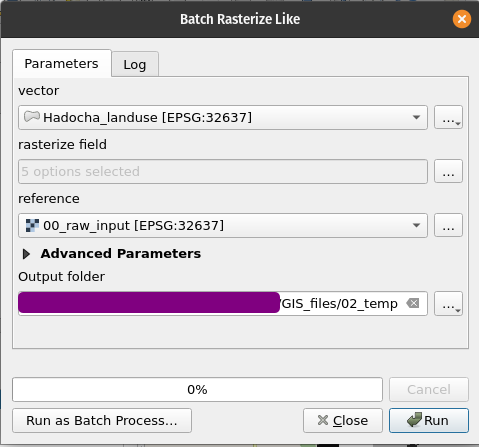
Try to run the script with a temporary directory as output folder. You should get the following errors:
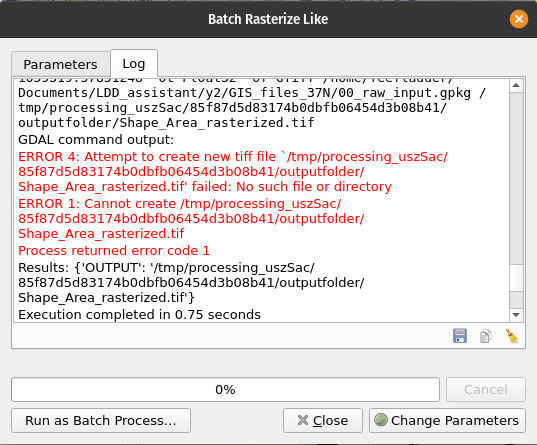
5.3.2. Temporary outputs and feedback
As we have seen, the script errors when we try to save to a temporary location. This is because QGIS tries to save the raster to a nonexistent folder. Thus, we have to create the folder if it doesn’t exist yet:
42            "nodatavalue",
43            "nodata value",
Next, we want to be able to cancel the operation between rasters. Add the following lines:
48        self.addParameter(param)
49        self.addParameter(
50            QgsProcessingParameterFolderDestination("outputfolder", "Output folder")
5.3.3. Load layers into QGIS
  1"""
  2Model exported as python.
  3Name : model
  4Group :
  5With QGIS : 32212
  6"""
  7
  8from pathlib import Path
  9
 10from qgis.core import QgsProcessing
 11from qgis.core import QgsProcessingAlgorithm
 12from qgis.core import QgsProcessingMultiStepFeedback
 13from qgis.core import QgsProcessingParameterVectorLayer
 14from qgis.core import QgsProcessingParameterField
 15from qgis.core import QgsProcessingParameterRasterLayer
 16from qgis.core import QgsProcessingParameterNumber
 17from qgis.core import QgsProcessingParameterFolderDestination
 18from qgis.core import QgsProcessingParameterDefinition
 19from qgis.core import QgsProject
 20from qgis.core import QgsProcessingUtils
 21import processing
 22
 23
 24class BatchRasterizeLike(QgsProcessingAlgorithm):
 25    final_layers = {}
 26
 27    def initAlgorithm(self, config=None):
 28        self.addParameter(
 29            QgsProcessingParameterVectorLayer("vector", "vector", defaultValue=None)
 30        )
 31        self.addParameter(
 32            QgsProcessingParameterField(
 33                "rasterizefield",
 34                "rasterize field",
 35                type=QgsProcessingParameterField.Any,
 36                parentLayerParameterName="vector",
 37                allowMultiple=True,
 38                defaultValue=None,
 39                defaultToAllFields=True,
 40            )
 41        )
 42        self.addParameter(
 43            QgsProcessingParameterRasterLayer("raster", "reference", defaultValue=None)
 44        )
 45        param = QgsProcessingParameterNumber(
 46            "nodatavalue",
 47            "nodata value",
 48            type=QgsProcessingParameterNumber.Double,
 49            defaultValue=-999,
 50        )
 51        param.setFlags(param.flags() | QgsProcessingParameterDefinition.FlagAdvanced)
 52        self.addParameter(param)
 53        self.addParameter(
 54            QgsProcessingParameterFolderDestination("outputfolder", "Output folder")
 55        )
 56
 57    def processAlgorithm(self, parameters, context, model_feedback):
 58        # Use a multi-step feedback, so that individual child algorithm progress reports are adjusted for the
 59        # overall progress through the model
 60        feedback = QgsProcessingMultiStepFeedback(1, model_feedback)
 61        results = {}
 62        outputs = {}
 63
 64        raster = self.parameterAsRasterLayer(parameters, "raster", context)
 65        fields = self.parameterAsFields(parameters, "rasterizefield", context)
 66        out_dir = self.parameterAsString(parameters, "outputfolder", context)
 67        Path(out_dir).mkdir(exist_ok=True)
 68
 69        for field in fields:
 70            out_path = str(Path(out_dir) / f"{field}_rasterized.tif")
 71
 72            if model_feedback.isCanceled():
 73                break
 74            model_feedback.pushInfo("rasterizing for:" + str(field))
 75
 76            # Rasterize (vector to raster)
 77            alg_params = {
 78                "BURN": 0,
 79                "DATA_TYPE": 5,  # Float32
 80                "EXTENT": parameters["raster"],
 81                "EXTRA": "",
 82                "FIELD": field,
 83                "HEIGHT": raster.rasterUnitsPerPixelY(),
 84                "INIT": None,
 85                "INPUT": parameters["vector"],
 86                "INVERT": False,
 87                "NODATA": parameters["nodatavalue"],
 88                "OPTIONS": "",
 89                "UNITS": 1,  # Georeferenced units
 90                "USE_Z": False,
 91                "WIDTH": raster.rasterUnitsPerPixelX(),
 92                "OUTPUT": out_path,
 93            }
 94            outputs[f"RasterizeVectorToRaster{field}"] = processing.run(
 95                "gdal:rasterize",
 96                alg_params,
 97                context=context,
 98                feedback=feedback,
 99                is_child_algorithm=True,
100            )
101            results[f"Raster_out{field}"] = outputs[f"RasterizeVectorToRaster{field}"][
102                "OUTPUT"
103            ]
104            self.final_layers[field] = QgsProcessingUtils.mapLayerFromString(
105                results[f"Raster_out{field}"], context
106            )
107        return results
108
109    def postProcessAlgorithm(self, context, feedback):
110        for name, layer in self.final_layers.items():
111            if layer.name() == "OUTPUT":
112                layer.setName(f"{name}_rasterized")
113            QgsProject.instance().addMapLayer(layer)
114        self.final_layers.clear()
115        return {}
116
117    def name(self):
118        return "batchrasterizelike"
119
120    def displayName(self):
121        return "Batch rasterize like"
122
123    def group(self):
124        return ""
125
126    def groupId(self):
127        return ""
128
129    def createInstance(self):
130        return BatchRasterizeLike()
5.3.4. Make loading layers optional
  1"""
  2Model exported as python.
  3Name : model
  4Group :
  5With QGIS : 32212
  6"""
  7
  8from pathlib import Path
  9
 10from qgis.core import QgsProcessing
 11from qgis.core import QgsProcessingAlgorithm
 12from qgis.core import QgsProcessingMultiStepFeedback
 13from qgis.core import QgsProcessingParameterVectorLayer
 14from qgis.core import QgsProcessingParameterField
 15from qgis.core import QgsProcessingParameterRasterLayer
 16from qgis.core import QgsProcessingParameterNumber
 17from qgis.core import QgsProcessingParameterFolderDestination
 18from qgis.core import QgsProcessingParameterDefinition
 19from qgis.core import QgsProcessingParameterBoolean
 20from qgis.core import QgsProject
 21from qgis.core import QgsProcessingUtils
 22import processing
 23
 24
 25class BatchRasterizeLike(QgsProcessingAlgorithm):
 26    final_layers = {}
 27    load_outputs = True
 28
 29    def initAlgorithm(self, config=None):
 30        self.addParameter(
 31            QgsProcessingParameterVectorLayer("vector", "vector", defaultValue=None)
 32        )
 33        self.addParameter(
 34            QgsProcessingParameterField(
 35                "rasterizefield",
 36                "rasterize field",
 37                type=QgsProcessingParameterField.Any,
 38                parentLayerParameterName="vector",
 39                allowMultiple=True,
 40                defaultValue=None,
 41                defaultToAllFields=True,
 42            )
 43        )
 44        self.addParameter(
 45            QgsProcessingParameterRasterLayer("raster", "reference", defaultValue=None)
 46        )
 47        self.addParameter(
 48            QgsProcessingParameterBoolean(
 49                "loadoutputs", "Load output layers", defaultValue=True
 50            )
 51        )
 52        param = QgsProcessingParameterNumber(
 53            "nodatavalue",
 54            "nodata value",
 55            type=QgsProcessingParameterNumber.Double,
 56            defaultValue=-999,
 57        )
 58        param.setFlags(param.flags() | QgsProcessingParameterDefinition.FlagAdvanced)
 59        self.addParameter(param)
 60        self.addParameter(
 61            QgsProcessingParameterFolderDestination("outputfolder", "Output folder")
 62        )
 63
 64    def processAlgorithm(self, parameters, context, model_feedback):
 65        # Use a multi-step feedback, so that individual child algorithm progress reports are adjusted for the
 66        # overall progress through the model
 67        feedback = QgsProcessingMultiStepFeedback(1, model_feedback)
 68        results = {}
 69        outputs = {}
 70
 71        raster = self.parameterAsRasterLayer(parameters, "raster", context)
 72        fields = self.parameterAsFields(parameters, "rasterizefield", context)
 73        out_dir = self.parameterAsString(parameters, "outputfolder", context)
 74        Path(out_dir).mkdir(exist_ok=True)
 75
 76        self.load_outputs = self.parameterAsBool(parameters, "loadoutputs", context)
 77
 78        for field in fields:
 79            out_path = str(Path(out_dir) / f"{field}_rasterized.tif")
 80
 81            if model_feedback.isCanceled():
 82                break
 83            model_feedback.pushInfo("rasterizing for:" + str(field))
 84
 85            # Rasterize (vector to raster)
 86            alg_params = {
 87                "BURN": 0,
 88                "DATA_TYPE": 5,  # Float32
 89                "EXTENT": parameters["raster"],
 90                "EXTRA": "",
 91                "FIELD": field,
 92                "HEIGHT": raster.rasterUnitsPerPixelY(),
 93                "INIT": None,
 94                "INPUT": parameters["vector"],
 95                "INVERT": False,
 96                "NODATA": parameters["nodatavalue"],
 97                "OPTIONS": "",
 98                "UNITS": 1,  # Georeferenced units
 99                "USE_Z": False,
100                "WIDTH": raster.rasterUnitsPerPixelX(),
101                "OUTPUT": out_path,
102            }
103            outputs[f"RasterizeVectorToRaster{field}"] = processing.run(
104                "gdal:rasterize",
105                alg_params,
106                context=context,
107                feedback=feedback,
108                is_child_algorithm=True,
109            )
110            results[f"Raster_out{field}"] = outputs[f"RasterizeVectorToRaster{field}"][
111                "OUTPUT"
112            ]
113            self.final_layers[field] = QgsProcessingUtils.mapLayerFromString(
114                results[f"Raster_out{field}"], context
115            )
116        return results
117
118    def postProcessAlgorithm(self, context, feedback):
119        if not self.load_outputs:
120            self.final_layers.clear()
121            return {}
122
123        for name, layer in self.final_layers.items():
124            if layer.name() == "OUTPUT":
125                layer.setName(f"{name}_rasterized")
126            QgsProject.instance().addMapLayer(layer)
127        self.final_layers.clear()
128        return {}
129
130    def name(self):
131        return "batchrasterizelike"
132
133    def displayName(self):
134        return "Batch rasterize like"
135
136    def group(self):
137        return ""
138
139    def groupId(self):
140        return ""
141
142    def createInstance(self):
143        return BatchRasterizeLike()
Solution
If you didn’t follow the above Follow Along:, you can use the below script.
In the Processig Toolbox, click the

copy-paste the following code:
  1import os
  2
  3from qgis.core import (
  4    QgsProcessing,
  5    QgsProcessingAlgorithm,
  6    QgsProcessingParameterRasterLayer,
  7    QgsProcessingParameterVectorLayer,
  8    QgsProcessingParameterField,
  9    QgsProcessingParameterBoolean,
 10    QgsProcessingParameterFolderDestination,
 11    QgsProcessingLayerPostProcessorInterface,
 12    QgsProcessingUtils,
 13    QgsProject,
 14    QgsRasterLayer,
 15)
 16
 17import processing
 18
 19
 20class Batch_raster(QgsProcessingAlgorithm):
 21    INPUT = "INPUT"
 22    FIELDS = "FIELDS"
 23    OUT_FOLDER = "OUT_FOLDER"
 24    LOAD_OUTPUTS = "LOAD_OUTPUTS"
 25
 26    final_layers = {}
 27    load_outputs = True
 28
 29    def initAlgorithm(self, config=None):
 30        self.addParameter(
 31            QgsProcessingParameterRasterLayer(
 32                "likeraster", "like raster", defaultValue=None
 33            )
 34        )
 35        self.addParameter(
 36            QgsProcessingParameterVectorLayer(self.INPUT, "vector", defaultValue=None)
 37        )
 38        self.addParameter(
 39            QgsProcessingParameterField(
 40                self.FIELDS,
 41                "fields to select",
 42                type=0,
 43                allowMultiple=True,
 44                defaultToAllFields=True,
 45                parentLayerParameterName=self.INPUT,
 46            )
 47        )
 48        self.addParameter(
 49            QgsProcessingParameterBoolean(
 50                "VERBOSE_LOG", "Verbose logging", optional=True, defaultValue=False
 51            )
 52        )
 53        self.addParameter(
 54            QgsProcessingParameterFolderDestination(self.OUT_FOLDER, "Output directory")
 55        ),
 56        self.addParameter(
 57            QgsProcessingParameterBoolean(
 58                self.LOAD_OUTPUTS,
 59                "Load output layers?",
 60                optional=True,
 61                defaultValue=True,
 62            )
 63        )
 64
 65    def processAlgorithm(self, parameters, context, feedback):
 66        # Use a multi-step feedback, so that individual child algorithm progress reports are adjusted for the
 67        # overall progress through the model
 68        results = {}
 69        outputs = {}
 70
 71        likeraster = self.parameterAsRasterLayer(parameters, "likeraster", context)
 72        vector = self.parameterAsVectorLayer(parameters, self.INPUT, context)
 73        fields = self.parameterAsFields(parameters, self.FIELDS, context)
 74        out_dir = self.parameterAsString(parameters, self.OUT_FOLDER, context)
 75        load = self.parameterAsBool(parameters, "LOAD_OUTPUTS", context)
 76        if not load:
 77            self.load_outputs = False
 78
 79        for index, field in enumerate(fields):
 80            if feedback.isCanceled():
 81                break
 82            feedback.pushInfo(str(field))
 83            if not "OUT_FOLDER" in out_dir:
 84                out_path = os.path.join(out_dir, f"{field}_rasterized.tif")
 85            else:
 86                out_path = "TEMPORARY_OUTPUT"
 87
 88            # Rasterize (vector to raster)
 89            alg_params = {
 90                "BURN": 0,
 91                "DATA_TYPE": 5,
 92                "EXTENT": likeraster.extent(),
 93                "EXTRA": "",
 94                "FIELD": field,
 95                "INIT": None,
 96                "INPUT": parameters[self.INPUT],
 97                "INVERT": False,
 98                "NODATA": 0,
 99                "OPTIONS": "",
100                "UNITS": 1,
101                "OUTPUT": f"{field}",
102                "HEIGHT": likeraster.rasterUnitsPerPixelY(),
103                "WIDTH": likeraster.rasterUnitsPerPixelX(),
104                "OUTPUT": out_path,
105            }
106
107            outputs[f"RasterizeVectorToRaster{field}"] = processing.run(
108                "gdal:rasterize",
109                alg_params,
110                is_child_algorithm=True,
111                context=context,
112                feedback=feedback,
113            )
114
115            results[f"Raster_out{field}"] = outputs[f"RasterizeVectorToRaster{field}"][
116                "OUTPUT"
117            ]
118            if out_path == "TEMPORARY_OUTPUT":
119                self.final_layers[field] = QgsProcessingUtils.mapLayerFromString(
120                    outputs[f"RasterizeVectorToRaster{field}"]["OUTPUT"], context
121                )
122            else:
123                self.final_layers[
124                    f"file_{index}"
125                ] = QgsProcessingUtils.mapLayerFromString(
126                    outputs[f"RasterizeVectorToRaster{field}"]["OUTPUT"], context
127                )
128            pcnt = int(index / len(fields) * 100)
129            feedback.setProgress(pcnt)
130        return results
131
132    ######################################################################
133    def postProcessAlgorithm(self, context, feedback):
134        if self.load_outputs:
135            for name, layer in self.final_layers.items():
136                if layer.name() == "OUTPUT":
137                    layer.setName(f"{name}_rasterized")
138                QgsProject.instance().addMapLayer(layer)
139        else:
140            self.load_outputs = True
141        self.final_layers.clear()
142        return {}
143
144    ######################################################################
145
146    def name(self):
147        return "Batch_rasterize_fields"
148
149    def displayName(self):
150        return "Batch_rasterize_fields"
151
152    def group(self):
153        return ""
154
155    def groupId(self):
156        return ""
157
158    def createInstance(self):
159        return Batch_raster()