1.1. Installing QGIS
There are different ways to install QGIS, depending on whether you need any
external processing toolboxes tuch as SAGA, GDAL or GRASS. We need SAGA and it
is nice to be able to have a look at GRASS plugins, so we will use the OSGeo4W
installation method for  . For other systems, such as
  OSX or
  , install
normally as outlined on the QGIS downloads page <https://qgis.org/en/site/forusers/download.html>
, install
normally as outlined on the QGIS downloads page <https://qgis.org/en/site/forusers/download.html>
Go to the QGIS download page and click the OSGeo4W Network installer.
Run the installer as administrator
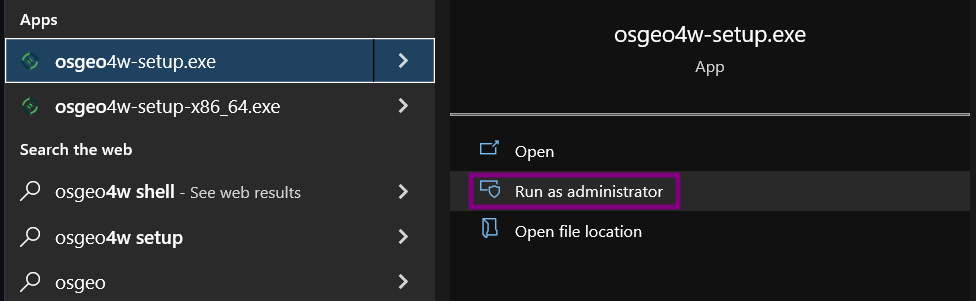
Select Express install
now select
 QGIS
QGIS QGIS LTR
- GDAL
- GRASS GIS
finish the installation normally. This should install QGIS 3.22.
1.1.1. Installing QRichDem
QRichDem is a plugin that makes RichDEM available to QGIS. I
wrote it myself and will be testing it this class. Especially OSX has not been
tested yet. It will install the package using pip, which may not be available if you
first installed QGIS. If you encounter any errors, see Manually installing pip
open up QGIS
Install the QRichDem plugin following the installation instructions
It will take some time to install RichDEM, so do not close QGIS while installing.
If everything worked out, you should have the RichDEM toolbox
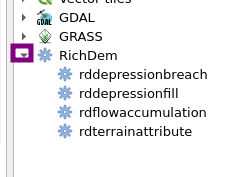
1.1.2. Manually installing pip
pip is a tool that installs Python packages. RichDEM is a python package that is not included in QGIS, so in order to install RichDEM, we need pip. However,
1.1.2.1.
Make sure you have not activated any environment. If you do not know what virtual environments or conda means, that probably means you do not have them installed. QGIS installs all its requirements in the system environment, so that is also where we want pip installed.
in a terminal, type:
python3 -m ensurepip --upgrade
python3 -m pip install richdem
This also install richdem itself.
1.1.2.2.
Open the osgeo4w setup, again, as administrator. This time choose
 advanced install. Follow the instructions until the Select Packages
screen. There, search for “pip”, click the + icon and click the turning arrows symbol
to select the highest available version.
advanced install. Follow the instructions until the Select Packages
screen. There, search for “pip”, click the + icon and click the turning arrows symbol
to select the highest available version.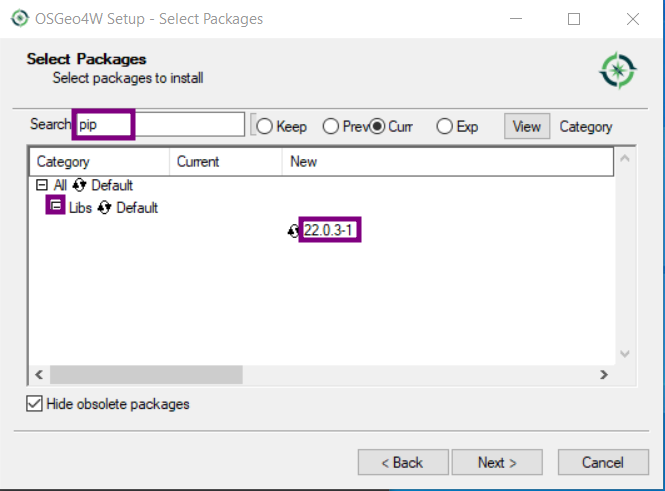
continue the rest of the installation and continue Installing QRichDem
If it still does not work, open the OsGEO4W shell and type in there:
python3 -m pip install richdem